Blog

How an IT Specialist Should Prepare for a Job Interview

The Resume

Any job search begins with a resume. The main goal at this stage is to use it to give your future manager complete information about yourself—as fully as possible, yet clearly and concisely.

The most important thing at this stage is not to fall into the trap of writing "What I WAS DOING." Instead, write "What I ACCOMPLISHED."

Bad Example:

Configuring Cisco switches

Read more →
Blog

Don’t Play the Blame Game in IT: The Privilege of Making Mistakes

Regardless of the scale of your organization or the hardware you use, glitches happen. Sometimes network access drops, a system crashes, or something else goes wrong. Naturally, when a problem is detected, the responsible staff takes every possible measure to restore functionality as quickly as possible.

After restoration, an analysis of the incident’s causes is conducted, and measures are developed to prevent similar situations in the future. All of this can be described as the "Incident Management Process."

Typically, companies use one of the following approaches to incident response:

Startups or Small Firms

In the event of any problems or outages, everyone turns to a specific specialist. That person analyzes the situation and resolves the issues.

Read more →
Blog

Monitoring system. Benefits and Challenges

Monitoring systems are, without a doubt, a useful and critical tool. Everyone recognizes their necessity. However, for most organizations, implementing these systems is fraught with difficulties. It often happens that engineers spend most of their time maintaining the monitoring system itself rather than having it help them solve problems.

Let me share some personal experience that will likely help many people better understand the problem.

Monitoring "As Usual"

So, management concludes that a monitoring system is critically important and assigns the task of implementing it. An engineer, who is already busy with their core duties—like configuring networks—is told to "deploy a monitoring system." Often, no one knows how to do this because it’s their first experience in this area. Let's say the company has a hundred remote branches, and they need to monitor the availability of communication links with each of them. In this situation, they start looking for free solutions, studying available options, and picking one.

Usually, they choose the simplest solution based on checking endpoint availability via ping. After spending significant time installing and configuring it, they expect immediate results. However, the system starts throwing false positives. For example, a remote branch has a primary and a backup link, and the system monitors both. The engineer gets an alert about link issues, checks the availability, and finds that everything is working fine. The monitoring system cried wolf. Despite cases where there are actual problems, most alerts turn out to be false. As a result, instead of helping, the monitoring system simply scatters your focus, leading people to eventually neglect it.
Read more →
Blog

How much do network engineers earn?

Let’s talk about the most interesting topic: salaries for modern IT specialists. Naturally, the figures mentioned here aren't set in stone, but rather serve as a rough benchmark.

Junior Network Engineer (or simply Network Engineer)

This person has studied the basics of network technologies.
They know what routing is and how switches work.
They have heard of firewalls.
They have a basic understanding of existing IT systems, servers, and virtualization—at the level of "read a couple of articles on Wikipedia or similar resources."

With this background knowledge, zero experience, but plenty of motivation, they arrive at an interview. After successfully passing it, they start working in a position paying $65,000–$71,000  per year.

At this new job, they handle simple, routine tasks: configuring equipment using pre-made templates, investigating why communication links are down, and fulfilling access requests. They handle other mundane duties. At the same time, thanks to constant practice and hands-on work with hardware, they dive much deeper into the theoretical aspects of how technologies work, while also gaining experience interacting with the company's specific network equipment.

Read more →
Networking

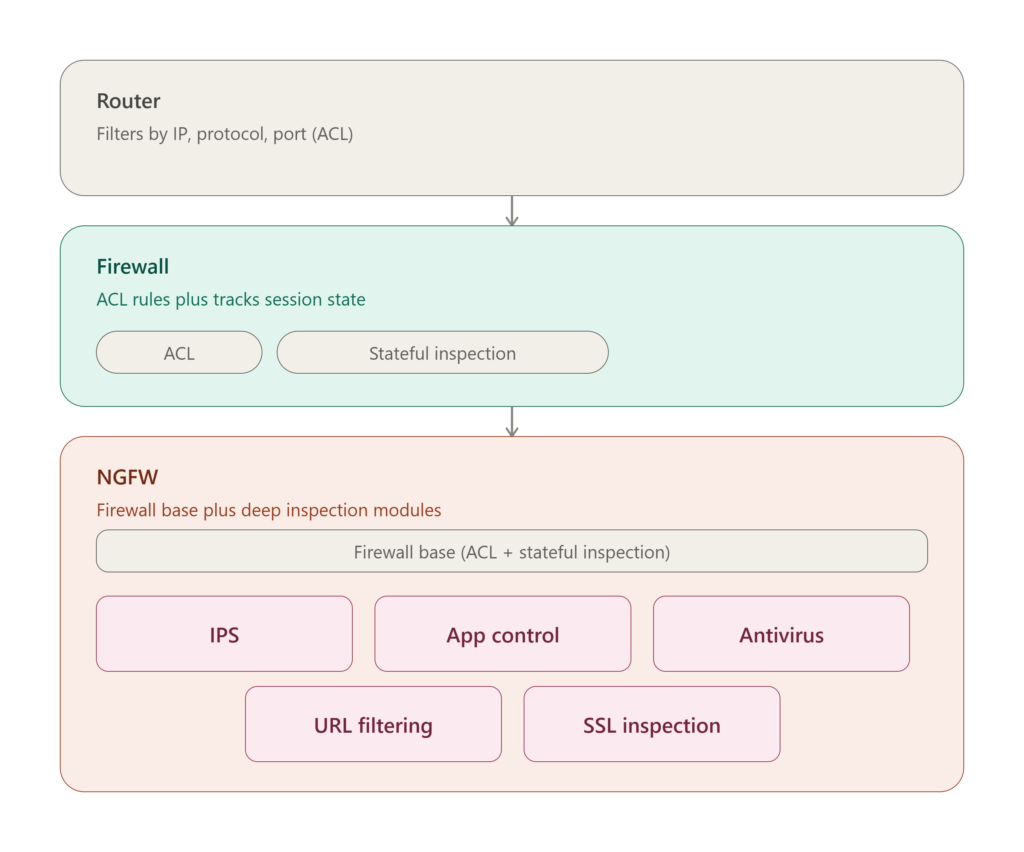
What is the difference between a router, a firewall and NGFW

Router

A router is a device designed primarily to transmit packets based on IP address information. Its job is to receive a packet on one of its interfaces, look in the routing table and decide which interface and which next gateway to send the traffic to.

Almost every router has a basic security feature - the ability to create access rules - Access Control Lists (ACL). In them, you need to specify the source, destination IP addresses, protocol and port and mark whether such traffic is allowed or prohibited. In this way, you can regulate network traffic, limiting unwanted connections.

Example:

from host to host by protocol and port action Allow

Read more →
Switch

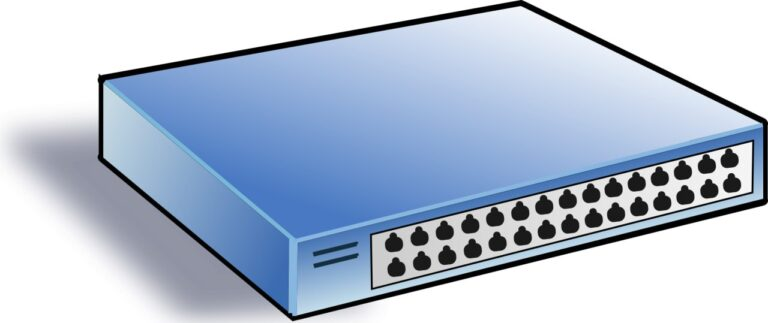
How does a L2 Switch work

The main task of a switch is to unite devices into a single network. It transmits data received on one of its interfaces to another based on the source and destination MAC address information contained in the transmitted frame.

Their logic is based on the Switching Table. As soon as a new host appears on the network and tries to transmit any information, the switch records that a new MAC address has appeared on one of its interfaces. A switch records this data in the form of a table like this:


Interface X - MAC address Y

Read more →
Switch

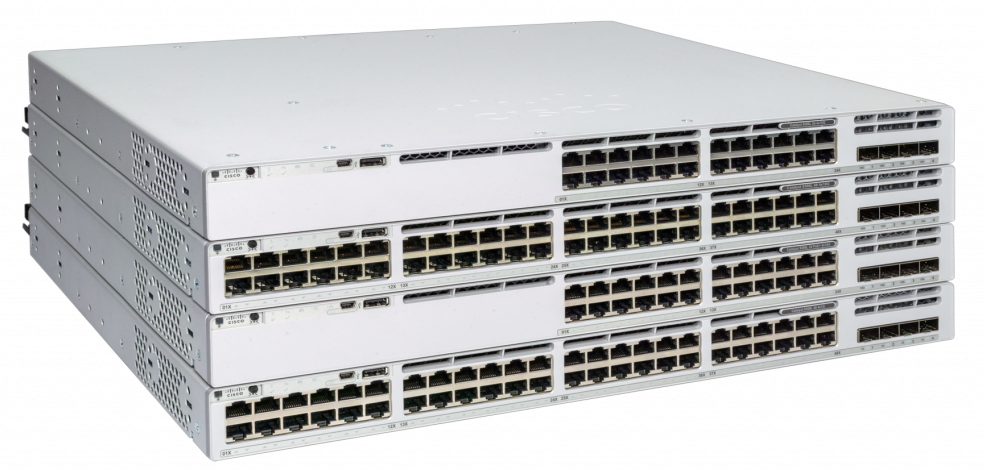
Cisco Catalyst 9200 Switch Overview and Configuration

Cisco Systems' advertising announcements will tell you about the latest 21st-century technologies in the all-new Cisco Catalyst 9200 series of switches, which is positioned to create LANs for small and medium-sized offices.

Everything new and technological is always liked by IT directors and other management personnel, but not by network engineers and IT administrators. But do not be afraid this time, because the new bright design and improved features essentially hides the updated, but good old Cisco 2960 switch, used everywhere, loved by network engineers for its ease of setup, convenience and reliability.

Cisco Catalyst 9200 Switch Overview and Configuration Configure Cisco Catalyst 9200

Configuring a Cisco Catalyst 9200 switch is almost exactly the same as configuring a Cisco Catalyst 2960 switch, with the exception of a few new features that will not be required by most companies.

You can safely use the following articles to configure the Cisco Catalyst 9200 as a switch for connecting users, printers, and other LAN resources. The differences will only be in the configuration of the interfaces, since the Cisco 9200 has at least 1G.

Read more →
Routers

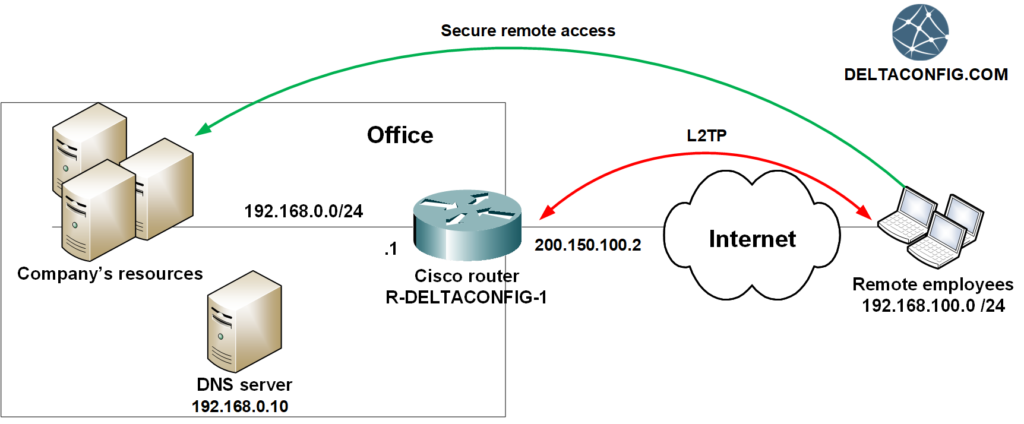
Configuring L2TP on Cisco router

L2TP technology on Cisco routers is usually used when it is necessary to provide simple and secure remote access for company employees.

Technology benefits

No additional hardware licenses are required. The maximum number of simultaneous user connections is limited by the capabilities of the equipment itself. Connection setup on the user side is performed in the built-in client in any operating system, whether it be Windows, Mac or Linux. No need to install additional software.

We will show an example of configuring L2TP on the Cisco 2911 router, however, any other model is configured in the same way.

The router was preconfigured in accordance with the guide “Basic configuration of the Cisco Router. Access to the Internet".

Read more →
Routers

Secure work from home (L2TP)

The situation occurred due to the coronavirus pandemic demonstrated the importance of having remote access for employees to the company resources. Which of course, has to be easy, convenient and secure.

Recently remote access technology was a privilege mainly for top managers and administrators. Now, it is a vital need even for an ordinary employee.

The technology itself and different ways of remote connections already exist for a long time. However, due to its weak spread, most managers don't understand which equipment is needed and how such access can be set up. And most importantly - how much does it cost?

What do we offer

For those companies and managers, who value their time and resources, my colleagues and I offer a turnkey solution for establishing remote access VPN based on the Cisco Systems equipment.

Read more →
Routers

IP SLA on Cisco Router

Sooner or later, but every company faces the problem with the Internet connection being out of order. And right after that, the question about backup channel arises. What settings needed to be done to automatically switch to backup link in case of an accident?

This article describes the configurations for Cisco 881 routers and similar models (1841, 1941, 2900, 3800...). If you have Cisco ASA, the settings for it are described in the article Dual WAN on Cisco ASA.

One of the easiest and most effective ways to configure a Cisco router - is using the IP SLA monitor. The device will track the availability of the primary Internet provider, and once the connection is lost (certain address won't respond to ICMP requests during several seconds), it will forward traffic through the backup link.

Read more →